Kinguinex 1.2 Adds Complete CD Key Management to WooCommerce
Selling digital game keys should be simple.
Unfortunately, many WooCommerce plugins either focus only on importing product information or overwhelm users with countless configuration pages and features that most stores never use.
Already known for importing game information directly from the Kinguin API, Kinguinex now goes far beyond product imports by introducing a complete workflow for managing and delivering your own CD keys directly inside WooCommerce.
Whether you’re selling Steam keys, game licenses, software activation codes, or any other unique digital codes, Kinguinex 1.2 helps automate the entire process while keeping your workflow clean, lightweight, and easy to manage.
Faster Product Import Workflow
Kinguinex 1.2 refines the entire product import experience, making it faster, clearer, and more intuitive for everyday use.
The product search field has been refactored to improve usability when searching the Kinguin API. Search results are displayed more efficiently, and a new Clear button lets you instantly reset the current search and start a new one without manually removing previous results or refreshing the page.
Once an import begins, Kinguinex now displays a loading indicator while product information is being retrieved and processed from the Kinguin API.
This provides immediate visual feedback that the operation is in progress, helping prevent duplicate clicks and making the import process feel more responsive and predictable.
Although these improvements are subtle, they significantly improve the day-to-day workflow for stores importing large product catalogs.
More Than a Kinguin API Importer
Importing product information is only one part of running a digital game store.
After creating products, store owners still need to:
- Store unique CD keys.
- Deliver purchased keys automatically.
- Prevent duplicate deliveries.
- Keep inventory synchronized.
- Track which customer received which key.
These tasks are often handled manually or require multiple plugins working together.
Kinguinex 1.2 brings everything into a single WooCommerce workflow.
Manage Your Own CD Key Inventory
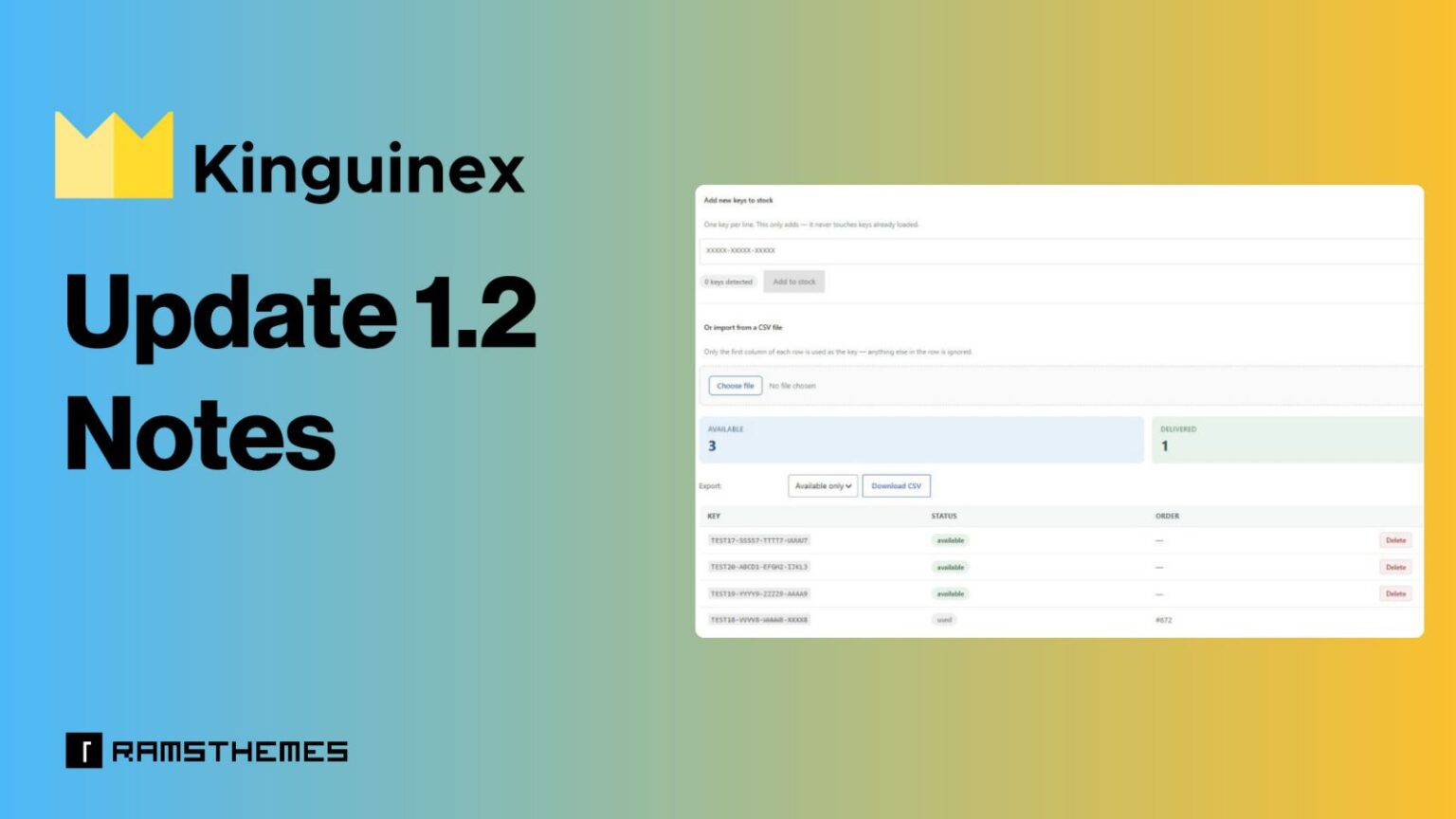
One of the biggest additions in Kinguinex 1.2 is the new Key Stock management panel, fully integrated into the WooCommerce product editor.
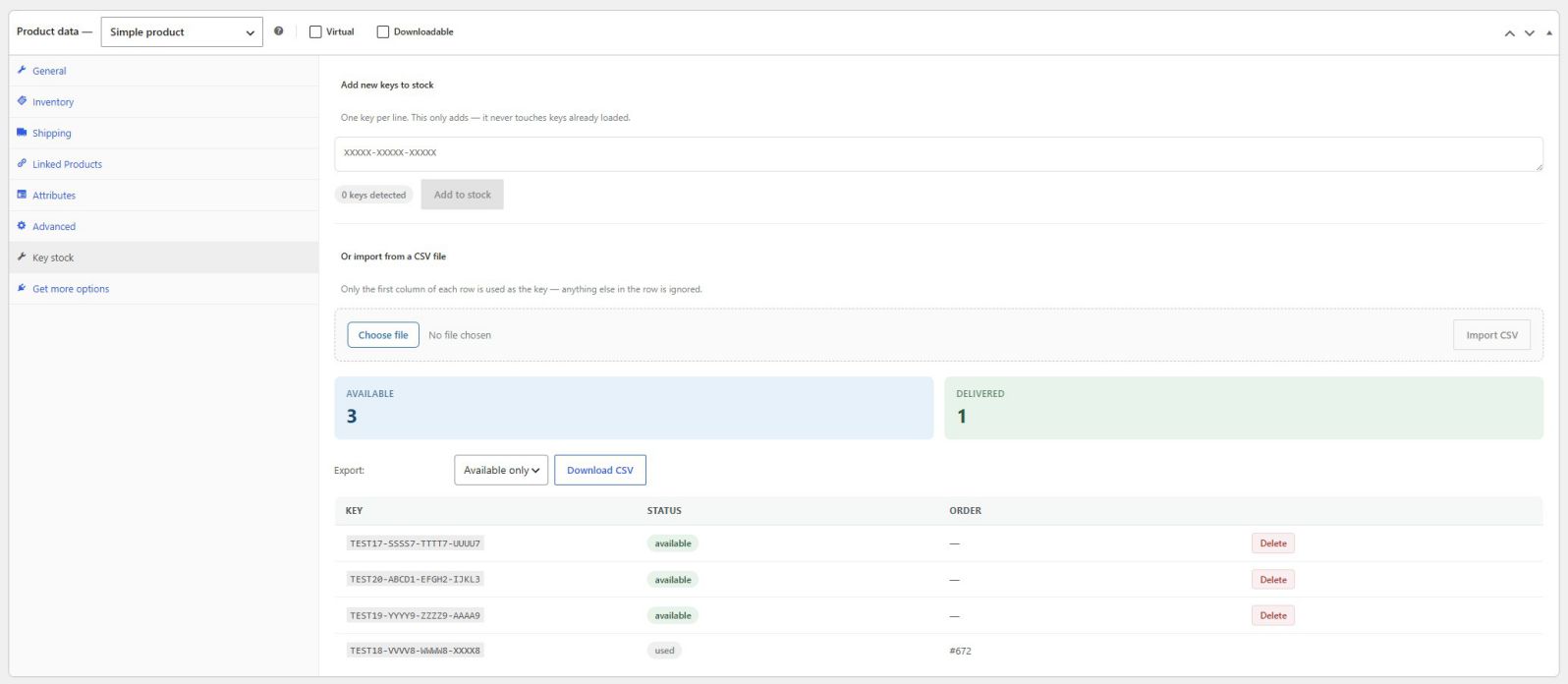
Instead of relying on spreadsheets or external tools, every product now includes its own dedicated inventory manager where you can add, import, export, monitor, and organize your CD keys from a single screen.
Add one or multiple CD keys by simply pasting them into the field, with one key per line. Whether you’re adding a handful of keys or an entire TXT file, Kinguinex detects them automatically and imports them into your available inventory.
For larger inventories, Kinguinex also supports CSV import and export, allowing you to manage hundreds or even thousands of keys with ease. Existing inventories can be backed up, transferred between stores, or updated in bulk without manual copy-and-paste.
The inventory panel also provides a complete overview of your product stock, including:
- Available keys ready for delivery.
- Delivered keys.
- Current WooCommerce stock synchronization.
- Delivery status for every individual key.
- The WooCommerce order associated with every delivered key.
- One-click deletion of unused keys.
- CSV export of available keys for backup or migration purposes.
Everything is managed directly from the WooCommerce product page, eliminating the need for external inventory software or additional plugins or extensions.
Why Doesn’t KINGUINEX Purchase CD Keys Automatically?
This is one of the most common questions and the answer is simple: that’s not how the digital key industry works.
KINGUINEX uses the Kinguin API exclusively to retrieve product information and metadata, including titles, descriptions, platforms, images, and other catalog details.
It does not purchase, retrieve, synchronize, or download CD keys from Kinguin.
This is by design.
Digital game keys can come from many different sources, including wholesalers, distributors, publishers, marketplaces, or your own inventory. Every business operates differently, and there is no single supplier or purchasing workflow that fits every store.
While Kinguin provides a public API for product information, services that allow automated purchasing or inventory access are typically private commercial integrations available only to approved partners and are not part of the public Kinguin API.
Instead of locking your store to a specific supplier, KINGUINEX is built around your own inventory. Whether your keys come from Kinguin, another marketplace, an authorized distributor, or direct publisher agreements, the workflow remains exactly the same.
Simply add your CD keys, and KINGUINEX takes care of inventory management, WooCommerce stock synchronization, automatic customer delivery, delivery tracking, and CSV import/export.
Built for Everyday Store Management
The goal of the new Key Stock panel is simple: make digital inventory management effortless.
Whether you sell ten game keys per week or thousands every month, the interface has been designed to remain clean and intuitive.
Store owners can immediately see how many keys are still available, how many have already been delivered, review the status of every key, identify which order received a particular activation code, import new inventories through CSV files, or export their remaining stock at any time.
Every feature is available from a single screen, reducing the number of clicks required to manage digital products while keeping the workflow simple and familiar for WooCommerce users.
Automatic Digital Key Delivery
Once an order is successfully completed, Kinguinex automatically delivers one available key to the customer using WooCommerce transactional emails.
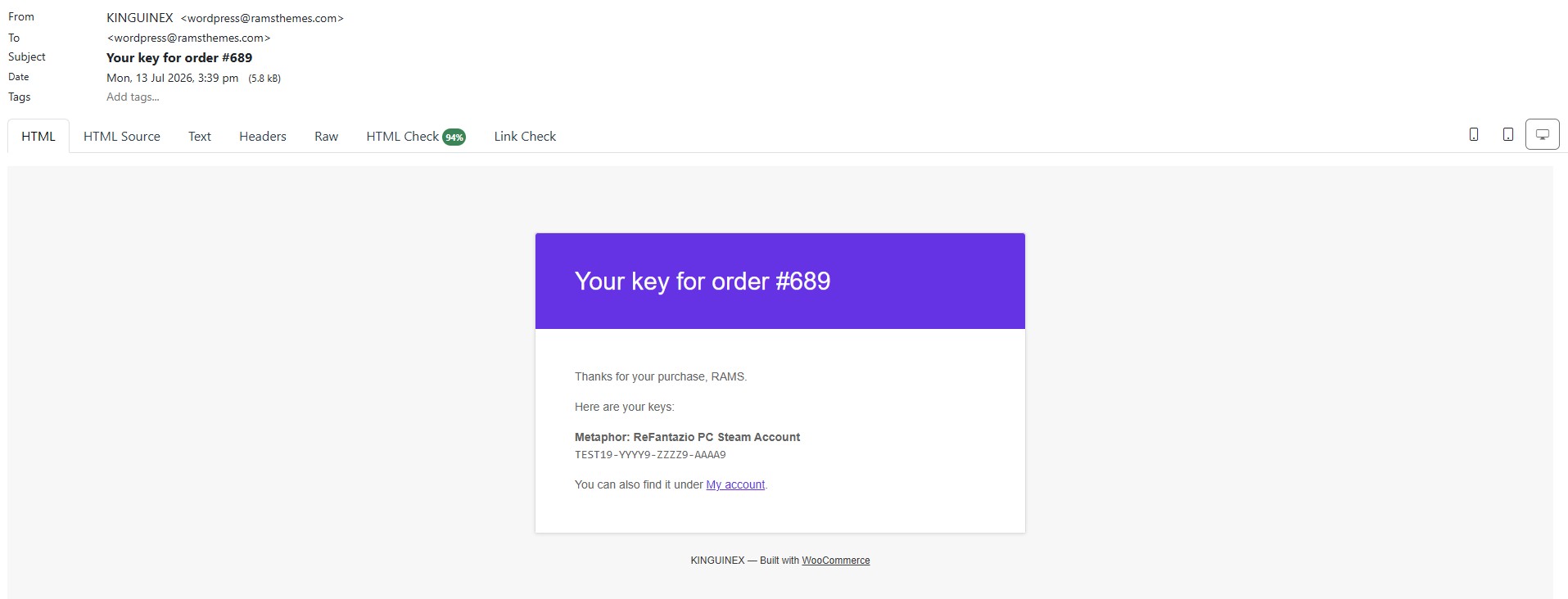
There is no need to manually copy keys or send emails after every purchase.
The delivery process is fully automated, allowing stores to sell digital products 24 hours a day.
This not only saves time but also creates a better purchasing experience for customers, who receive their activation keys immediately.
Never Deliver the Same Key Twice
Every delivered key is automatically removed from the available inventory after it has been assigned to an order.
This helps keep your stock synchronized while ensuring that every customer receives a unique activation code.
No duplicate deliveries.
No manual stock adjustments.
No unnecessary administration.
Complete Delivery History
Managing digital inventory also means knowing exactly what happened after each sale.
Kinguinex 1.2 introduces a new Delivered Keys section where administrators can review every delivered key.
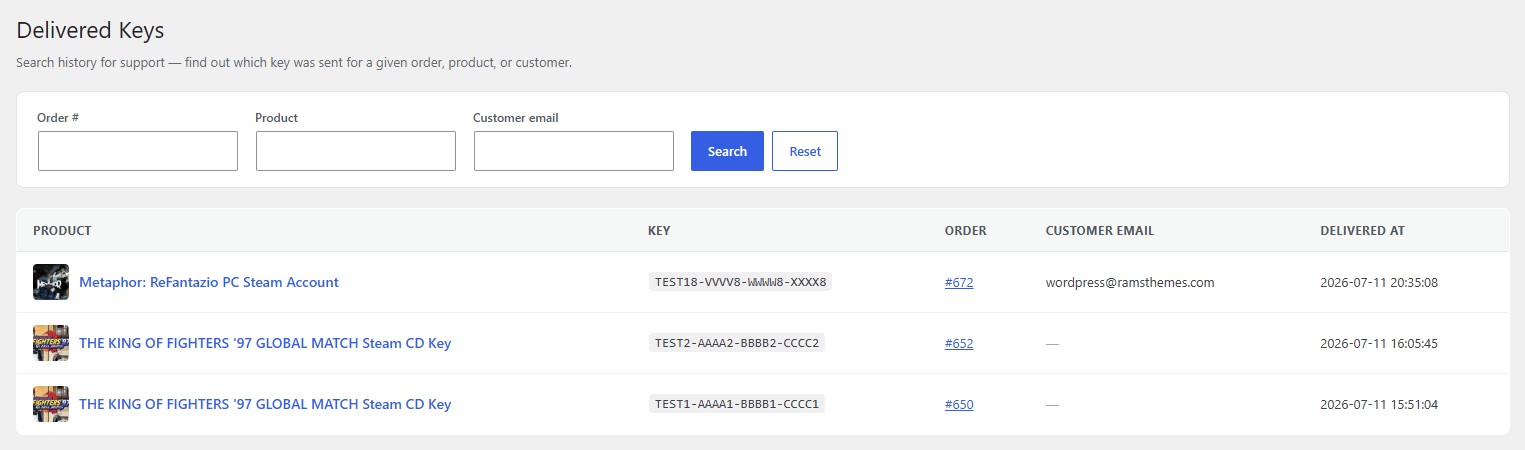
For each delivery, the plugin records:
- The delivered CD key.
- The WooCommerce order.
- Delivery date and time.
This provides a complete audit trail for customer support, troubleshooting, and inventory verification.
Display Available Stock on the Frontend
Some digital stores prefer showing customers how many activation keys remain available.
Kinguinex 1.2 introduces the new shortcode:
[kinguinex_stock]
This shortcode displays the remaining number of available CD keys directly on the product page or any loop where shortcodes are supported.
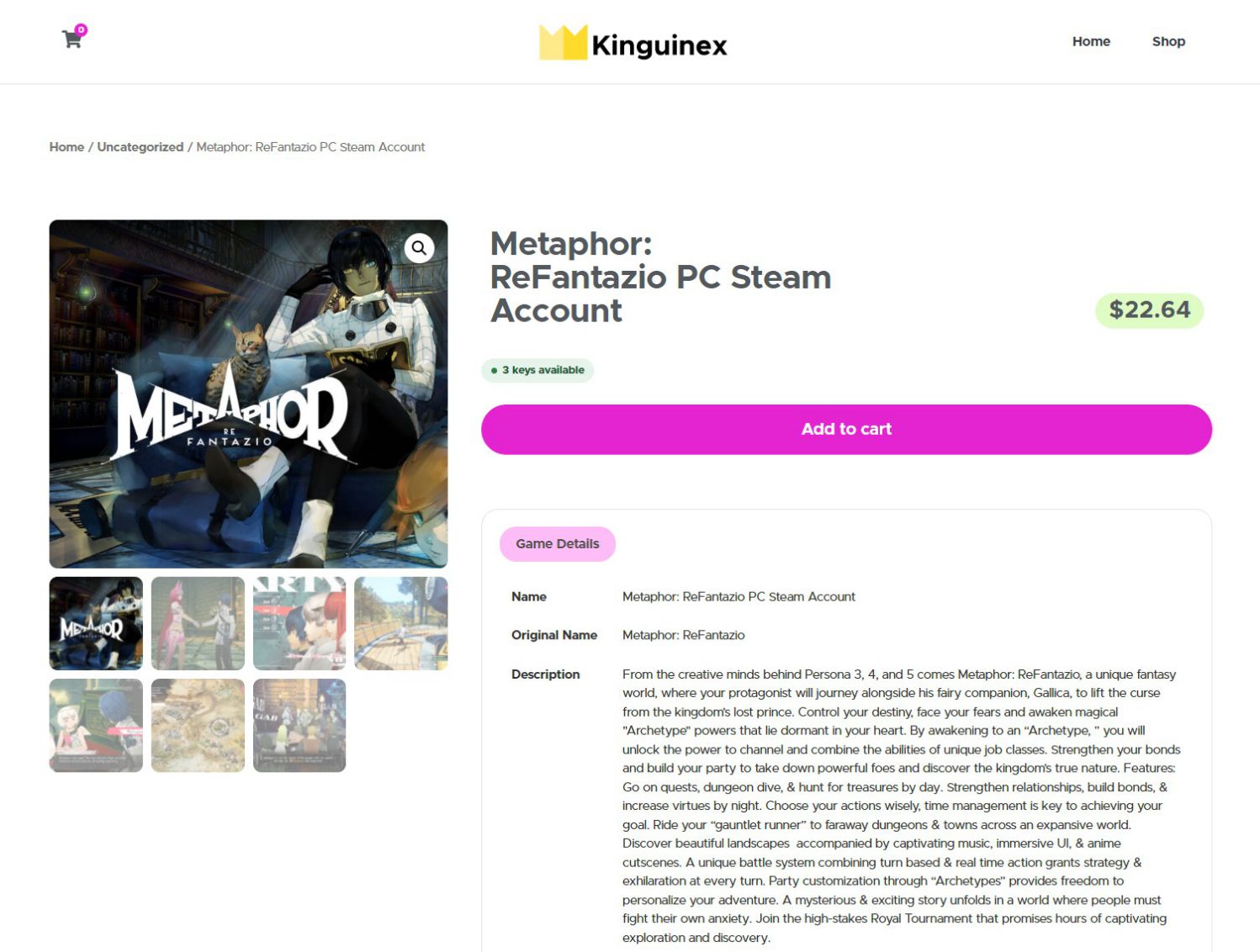
It provides customers with real-time inventory information while encouraging faster purchasing decisions.
Built for Simplicity
One of the core goals behind Kinguinex has always been simplicity.
Many WooCommerce digital delivery plugins try to solve every possible scenario, resulting in dozens of menus, endless settings, and complicated workflows.
Kinguinex follows a different philosophy.
It focuses on the features that digital game stores actually use every day:
- Import game data from the Kinguin API.
- Manage your own CD keys.
- Deliver keys automatically.
- Track deliveries.
- Keep inventory organized.
Nothing more.
Nothing less.
Why Choose Kinguinex?
Kinguinex combines product importing and digital key management into a single lightweight WooCommerce plugin.
Instead of juggling multiple extensions, you can manage your product catalog, digital inventory, and automatic deliveries from one familiar interface.
Whether you’re launching a new game store or expanding an existing WooCommerce business, Kinguinex helps reduce manual work while keeping your digital products organized and your customers satisfied.
Kinguinex 1.2
With built-in CD key management, automatic digital delivery, delivery history, frontend stock display, and continued improvements to the Kinguin importer, Kinguinex 1.2 represents a significant step forward for WooCommerce game stores.
If you’re looking for a clean, efficient, and purpose-built solution for selling digital game keys with WooCommerce, Kinguinex 1.2 delivers everything you need—without unnecessary complexity.