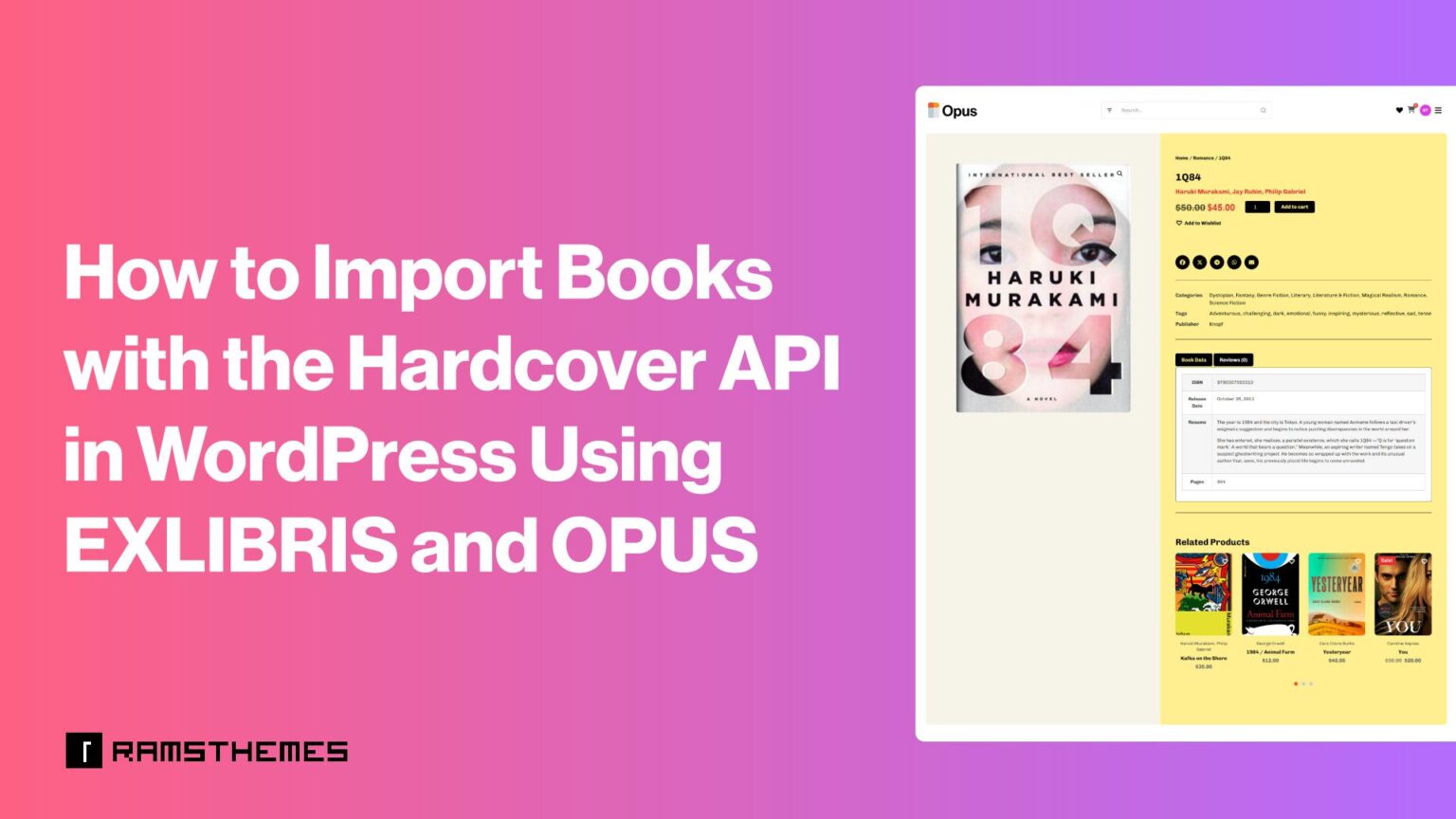
Building an online bookstore should be about discovering great books and reaching readers—not spending hours entering book information one product at a time.
If you’ve ever created a WooCommerce book catalog manually, you know how frustrating the process can become. Every product needs a title, ISBN, cover image, publication date, description, page count, categories, and other details. Multiply that by hundreds or thousands of books, and catalog management quickly turns into a full-time job.
That’s where the Hardcover API makes a difference.
With the Hardcover integration available in EXLIBRIS and OPUS, you can search for books and import available metadata directly into your WordPress bookstore. Instead of building every product from scratch, you can use an external book database to speed up catalog creation and spend more time growing your business.
What Is the Hardcover API?
The Hardcover API provides access to book information from the Hardcover catalog. It allows compatible applications to search for books and retrieve metadata through an API connection.
For bookstore owners, this means less repetitive data entry and a more efficient way to create product listings.
Depending on the information available for each title, imported metadata can include:
- ISBN and Hardcover ID.
- Book cover images.
- Publication dates.
- Descriptions and summaries.
- Page counts.
- Categories and genres.
- Tags.
Rather than manually researching every book, copying information from different websites, and uploading images one by one, you can retrieve available information through the integrated importer.
How to Use the Hardcover API with EXLIBRIS and OPUS
Both EXLIBRIS and OPUS bring Hardcover API integration into a WordPress bookstore workflow. The general process is straightforward: connect your Hardcover account, search for a book from your product editor, and import the available information.
Step 1: Get Your Hardcover API Token
First, you need a Hardcover account and an API access token.
- Visit Hardcover and sign in to your account. Open the API section.
- Create your API KEY to Generate your API Bearer Token.
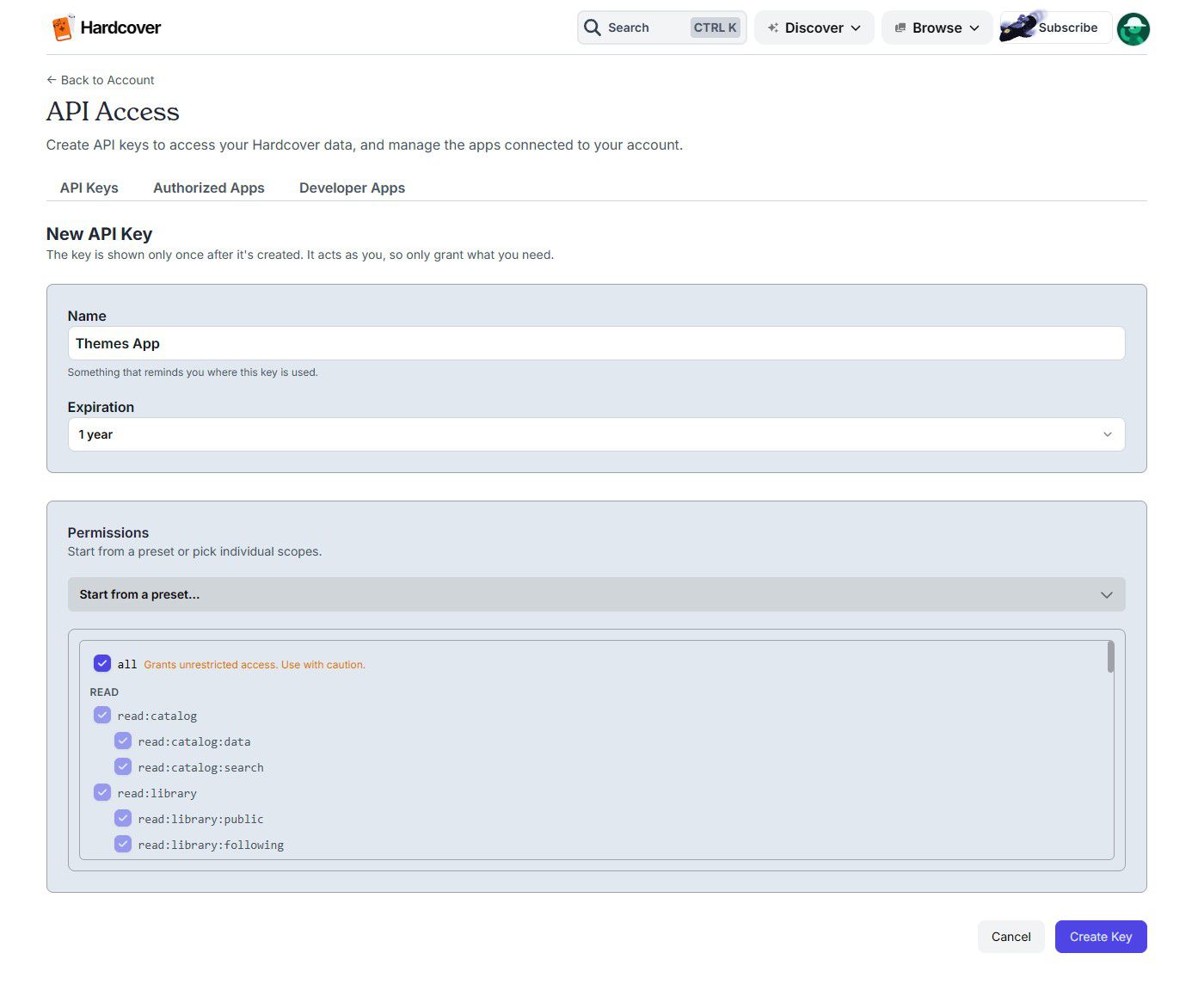
- Copy the token so you can connect your WordPress theme.
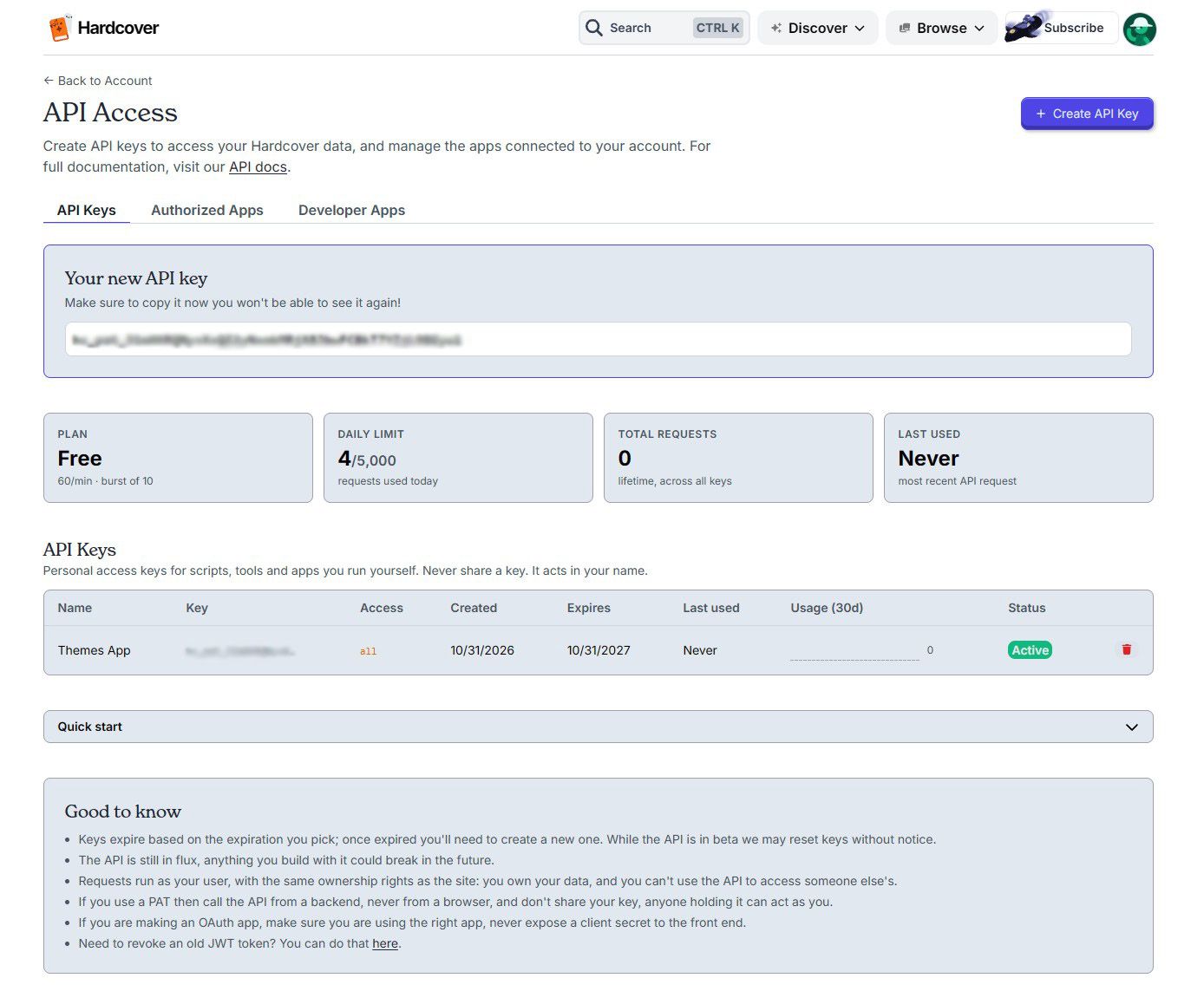
The token authorizes your website to communicate with the Hardcover API.
Step 2: Connect Hardcover to Your WordPress Theme
Open your theme’s Hardcover API settings and paste the Bearer Token into the corresponding field.

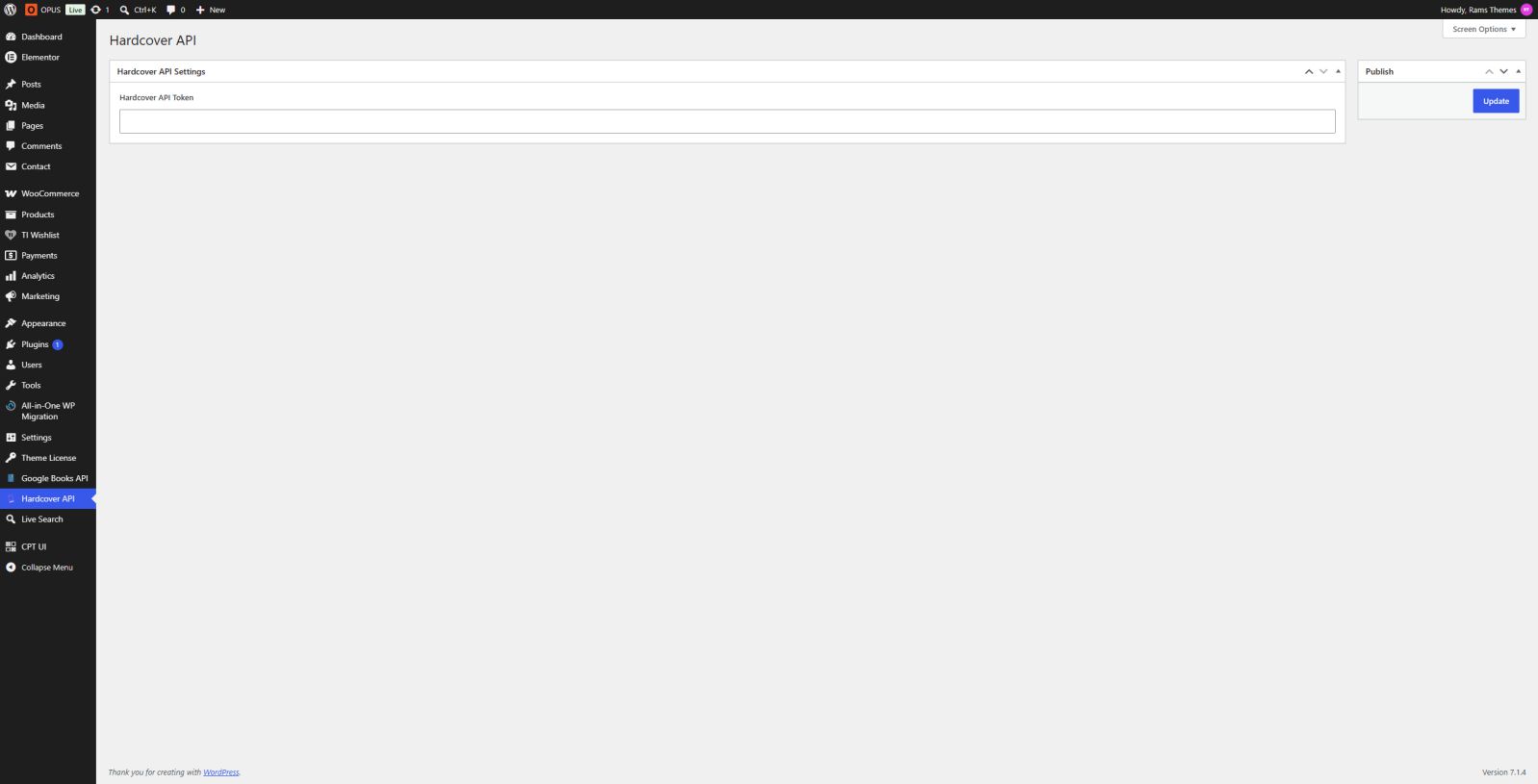
Once the connection is configured, your bookstore can communicate with Hardcover and retrieve book information through the integrated search functionality.
This eliminates the need to build a separate API integration or manually connect an external book database to WooCommerce.
Step 3: Search for a Book
Go to the WordPress product editor and use the Hardcover live search field to find the book you want to add.
You can search by book title, review the available results, and select the matching edition or entry.
This is particularly useful when building a catalog with hundreds of titles. Instead of researching each book independently, you can find its information directly from your WordPress dashboard.
Step 4: Import Book Metadata
After selecting a search result, the theme retrieves the available information and populates the corresponding book fields.
Depending on the Hardcover entry, this can include the ISBN, Hardcover ID, cover image, publication date, description, page count, categories, and tags.
You can then review the imported information, complete any missing details, and publish your WooCommerce product.
Import on EXLIBRIS:
Import on OPUS:
The result is a much faster product creation workflow, with less repetitive work and a more consistent catalog.
Why Importing Book Data Matters for Your Online Store
Manual product creation is manageable when you only sell a handful of books. But as your catalog grows, the workload increases dramatically.
Consider everything involved in adding a single book:
- Finding reliable bibliographic information.
- Looking for the correct cover image.
- Copying the ISBN and publication date.
- Writing or sourcing a description.
- Entering page counts and categories.
- Organizing the product within your store.
Now imagine repeating those tasks for 500 or 2,000 books.
The problem isn’t simply the time required. Manual data entry also creates opportunities for inconsistent formatting, missing information, incorrect ISBNs, and incomplete product pages.
Using the Hardcover API helps reduce that workload by retrieving available metadata directly from an external source. You can build your catalog more efficiently while keeping the information organized within WooCommerce.
Your time is better spent managing your bookstore, promoting your products, and serving your customers—not copying book details all day.
EXLIBRIS: A Complete, App-Inspired WooCommerce Bookstore
EXLIBRIS is a purpose-built WordPress theme for online bookstores, built with Bootstrap, WooCommerce, and ACF Pro.
Its app-inspired interface provides a clean and modern shopping experience, with layouts designed specifically for books and literary catalogs.
The theme combines Hardcover API and Google Books API integrations, giving you two sources for importing book metadata directly into your store.
With EXLIBRIS, you also get:
- Dedicated author and publisher taxonomies.
- Automatic author and publisher profile pages.
- Book previews and PDF sample uploads.
- Native AJAX Live Search.
- Built-in Dark Mode.
- Wishlist functionality.
- Responsive layouts and RTL support.
- WooCommerce product pages designed for books.
EXLIBRIS is an excellent choice if you want a ready-made bookstore experience with a distinctive interface and powerful catalog management features.
Stop building every book listing manually. Let EXLIBRIS help you create and manage your bookstore more efficiently.

OPUS: Build Your Bookstore Visually with Elementor
OPUS takes a different approach. It’s a WooCommerce bookstore theme built around Elementor, giving you greater visual control over your website’s design.
You can create and customize your store pages using Elementor’s drag-and-drop interface, without having to build layouts from scratch with code.
Its Hardcover API integration helps reduce the manual work involved in adding books, while WooCommerce handles your products, shopping cart, and checkout.
OPUS also includes:
- Elementor-based page building and customization.
- Book Authors and Book Publishers taxonomies.
- Book previews and sample chapters.
- AJAX Live Search.
- Wishlist functionality.
- Customizable storefront layouts.
- Responsive design.
- A dedicated blog for reviews, editorial content, and literary news.
OPUS is ideal for bookstore owners who want more creative freedom over their website while benefiting from a more efficient book catalog workflow.
Design your bookstore your way, import book information with Hardcover, and build a shopping experience that reflects your brand.

EXLIBRIS vs. OPUS: Which Bookstore Theme Should You Choose?
Both themes are designed to help you build a professional WooCommerce bookstore and reduce the time spent managing book information. The main difference is how you want to design and customize your website.
Choose EXLIBRIS if you prefer a polished, app-inspired bookstore with a distinctive interface, dedicated book features, and both Hardcover API and Google Books API integrations.
Choose OPUS if you want the creative flexibility of Elementor to visually customize your storefront, arrange your pages, and create a shopping experience tailored to your brand.
You don’t need to compromise between a professional bookstore design and efficient catalog management. Both themes bring specialized bookstore functionality to WordPress, helping you spend less time entering product information and more time building your business.
Build Your Bookstore Without the Manual Work
A growing book catalog shouldn’t mean endless hours of copying ISBNs, searching for covers, writing descriptions, and filling in product fields.
With Hardcover API integration, EXLIBRIS and OPUS help simplify one of the most time-consuming parts of running an online bookstore: adding and organizing books.
Choose EXLIBRIS for its distinctive app-inspired WooCommerce experience and dual Hardcover and Google Books integrations, or OPUS for the visual freedom of Elementor.
Both give you a better starting point for building a professional online bookstore with WordPress.
Spend less time entering book data. Spend more time selling books.
Frequently Asked Questions
Yes. EXLIBRIS and OPUS integrate Hardcover API functionality into the bookstore workflow, allowing you to search for books and import available metadata into your WordPress products.
Available information includes ISBN, Hardcover ID, cover images, publication dates, descriptions, page counts, categories, and tags. The information depends on the selected book entry.
No. You need to generate your Hardcover API token and enter it in the theme’s API settings. The integrated importer handles the communication with Hardcover.
Yes. EXLIBRIS includes both Hardcover API and Google Books API integrations, giving you alternative sources for retrieving book metadata.
Yes. OPUS is built with WooCommerce and Elementor, allowing you to create and customize an online bookstore while managing products and orders through WooCommerce.
OPUS is the natural choice if you want to build your bookstore visually with Elementor. EXLIBRIS is better suited to those who prefer its own app-inspired design and bookstore-focused interface.