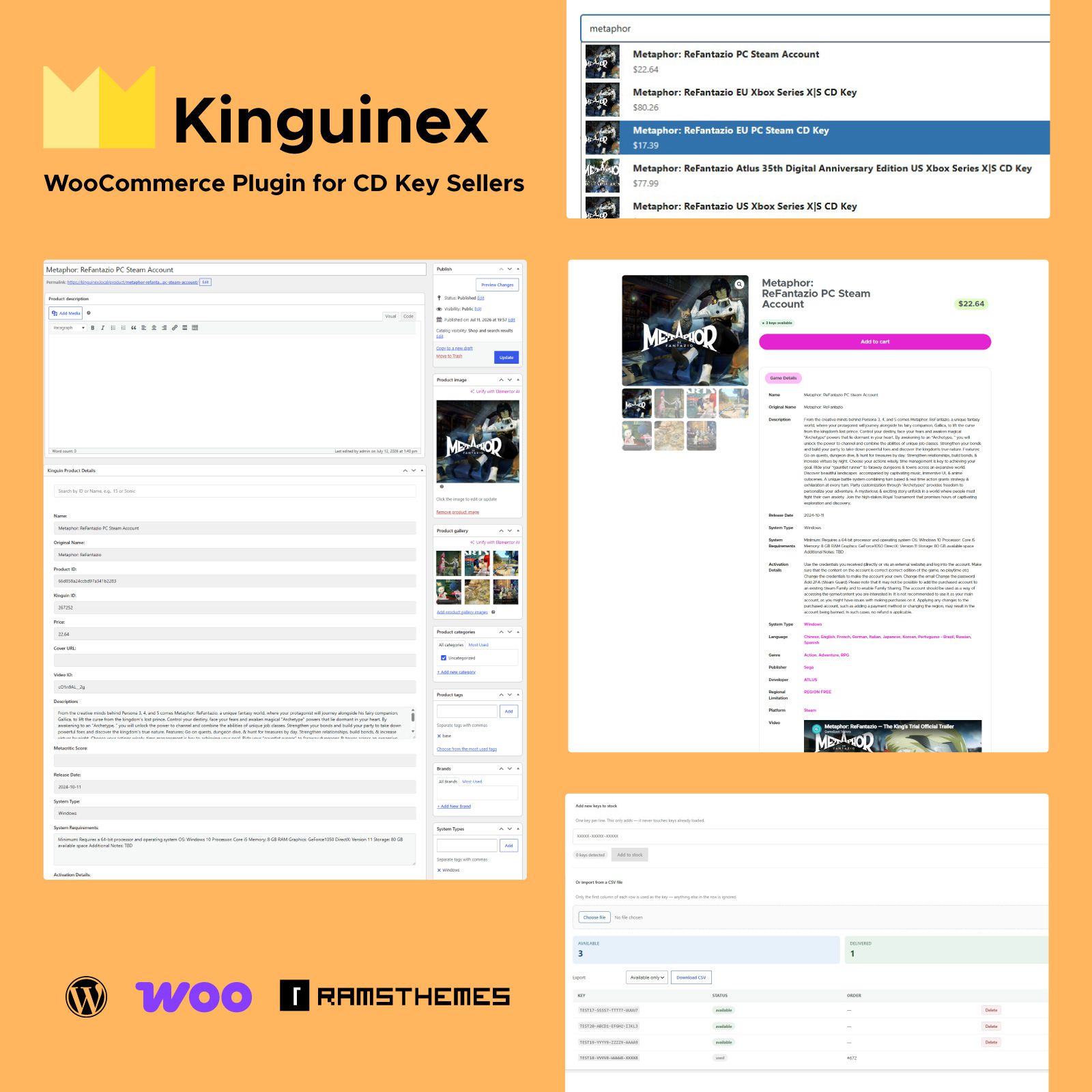
Kinguinex – The Smart WooCommerce Plugin for Selling CD Keys
Manage Game Data Easier
Import game information from the Kinguin API, manage your own CD key inventory, and automate digital key delivery with a clean, lightweight WooCommerce plugin.
Import Product Data. Sell Your Own CD Keys.
Kinguinex connects WooCommerce with the Kinguin API to import game information, images, and metadata in seconds.
Once your products are created, Kinguinex helps you manage your own CD key inventory, synchronize stock automatically, and deliver purchased keys instantly by email.
Everything happens inside WordPress using WooCommerce’s native workflow—without unnecessary complexity.
Why Kinguinex?
Built for Simplicity
Many WooCommerce plugins try to solve every possible scenario by adding dozens of menus, settings, and configuration pages.
Kinguinex takes a different approach.
It focuses on the features digital game stores actually use every day, providing a clean interface, sensible defaults, and a workflow that works out of the box.
Spend less time configuring your store and more time selling.
Import Product Data from Kinguin
Instead of manually copying information from the Kinguin marketplace, search products directly from your WordPress dashboard.
Import titles, descriptions, images, galleries, and metadata with only a few clicks.
Search by product name or exact Kinguin Game ID.
Manage Your Own CD Keys
This is where Kinguinex goes beyond a simple API importer.
Kinguinex 1.2 – WooCommerce CD Key Management & Automatic Delivery
Paste your own CD keys directly into WooCommerce and let the plugin handle delivery automatically after a successful purchase.
Never Deliver the Same Key Twice
Every purchased key is automatically removed from inventory immediately after delivery.
Stock remains synchronized with WooCommerce, helping prevent duplicate deliveries and keeping your inventory accurate even when your store grows.
Automatic Email Delivery
Purchased keys are delivered automatically through WooCommerce transactional emails.
Customers receive their keys immediately after payment while you eliminate manual work.
Complete Audit History
Every delivered key is recorded.
Track which key was delivered, when it happened, and to which WooCommerce order.
Simple.
Transparent.
Reliable.
Lightweight by Design
No endless configuration pages.
No unnecessary features.
No bloated interface.
Just the tools required to import products, manage digital inventory, and automate CD key delivery inside WooCommerce.
Perfect for
- WooCommerce Game Stores
- CD Key Sellers
- Digital Product Stores
- Kinguin users
- Steam Key Stores
- Game Key Shops
- Video Game Retailers
- Digital Downloads
Frequently Ask Questions
KINGUINEX is a WordPress plugin built for WooCommerce stores selling digital games and CD keys. It imports product information directly from the Kinguin API, lets you manage your own CD key inventory, automatically delivers purchased keys, keeps WooCommerce stock synchronized, and tracks every delivered key—all from a clean, lightweight interface designed for fast and efficient store management.
Kinguinex helps WooCommerce store owners build and manage digital game stores faster by combining product data from the Kinguin API with powerful CD key management.
Key features include:
- Search and import product information directly from the Kinguin API.
- Search by product name or exact Kinguin Game ID.
- Live AJAX search for a faster and smoother WordPress admin experience.
- Automatically import featured images and product galleries when available.
- Import product details into WooCommerce, custom fields, and taxonomies.
- Manage your own CD key inventory directly from WooCommerce.
- Automatically deliver purchased CD keys through WooCommerce transactional emails.
- Keep CD key inventory synchronized with WooCommerce stock levels.
- Prevent the same CD key from being delivered more than once.
- Keep a complete audit history of delivered keys.
- Works with any WordPress theme or page builder.
- Requires WooCommerce.
Important
Kinguinex uses the Kinguin API only to retrieve product information and metadata.
The plugin does not download, purchase, synchronize, or manage CD keys from Kinguin. CD keys are always supplied and managed by you.
No.
KINGUINEX uses the Kinguin API exclusively to retrieve product information and metadata, such as titles, descriptions, platforms, images, and other catalog details.
CD keys are not retrieved from Kinguin and are not purchased automatically.
This is intentional.
Digital game keys can come from many different sources, including distributors, publishers, wholesalers, marketplaces, or your own inventory. Every business operates differently, so KINGUINEX is designed to let you manage your own CD key stock regardless of where your keys come from.
While Kinguin provides a public API for product information, access to merchant APIs that allow automated purchasing and inventory management is generally restricted and subject to commercial approval. These services are not publicly available to every developer or store owner.
For this reason, KINGUINEX focuses on what every store can reliably automate:
- Importing product information from the Kinguin API.
- Managing your own CD key inventory.
- Synchronizing WooCommerce stock.
- Automatically delivering purchased keys.
- Tracking every delivered key through a complete audit history.
This approach gives you complete control over your inventory without depending on private supplier integrations or marketplace-specific agreements.
Yes, plugin uses Kinguin API and is an UNOFFICIAL plugin.
To get data you need to get a Kinguin API Key from their developer section.
You can also test the endpoints on API using POSTMAN. Example:
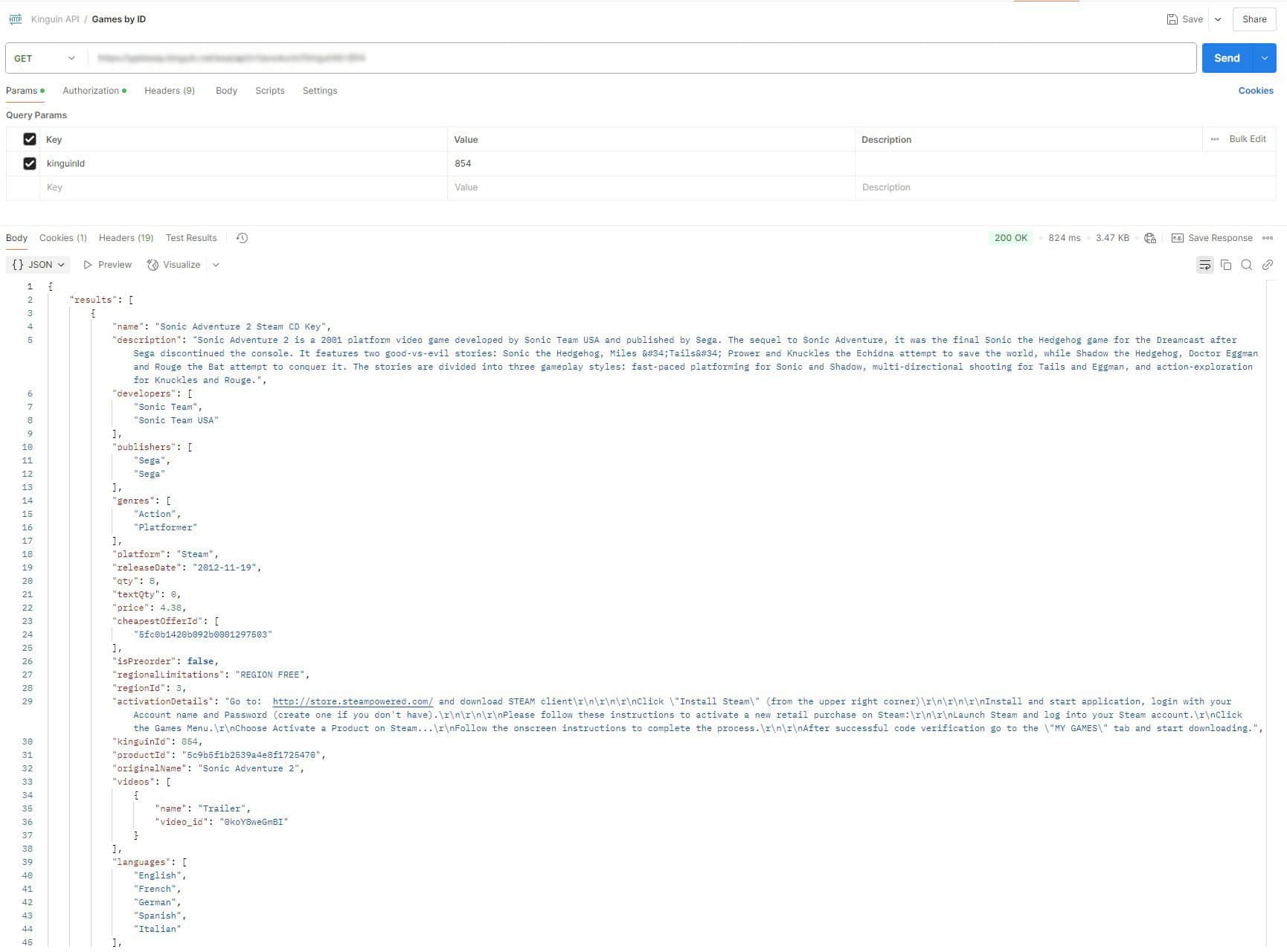
We’re NOT affiliated with Kinguin or its official plugin. We simply offer a different alternative for other uses.
You should NOT confuse KINGUINEX plugin with the KINGUIN Official Plugin as they are for different uses, nor should you request support for the official Kinguin plugin from us.
Theme used in Live Demo is a custom Elementor template made by us and used only for showcase purposes. It is NOT included on the package for customers.
Plugin comes with a default output that runs automatically before adding a new tab for WooCommerce product page. The default CSS output also can be customized. The visual result will depend on the theme you are using.
By saving the fields, images and taxonomies in WP, you can then reuse them as you wish, creating your own frontend with any builder.
You can access it Here 👈
Yes, questions only available via support tickets or email only for verified customers.