Upload ZIP Images to S3 with PicToS3 WordPress Plugin
PicToS3 is a powerful WordPress plugin designed for creators who regularly work with ZIP files containing image sequences — especially for manga chapters, illustrated novels, or serialized content. It automates the extraction and display of images, saving hours of repetitive uploads and streamlining your publishing workflow.
What Is PicToS3?
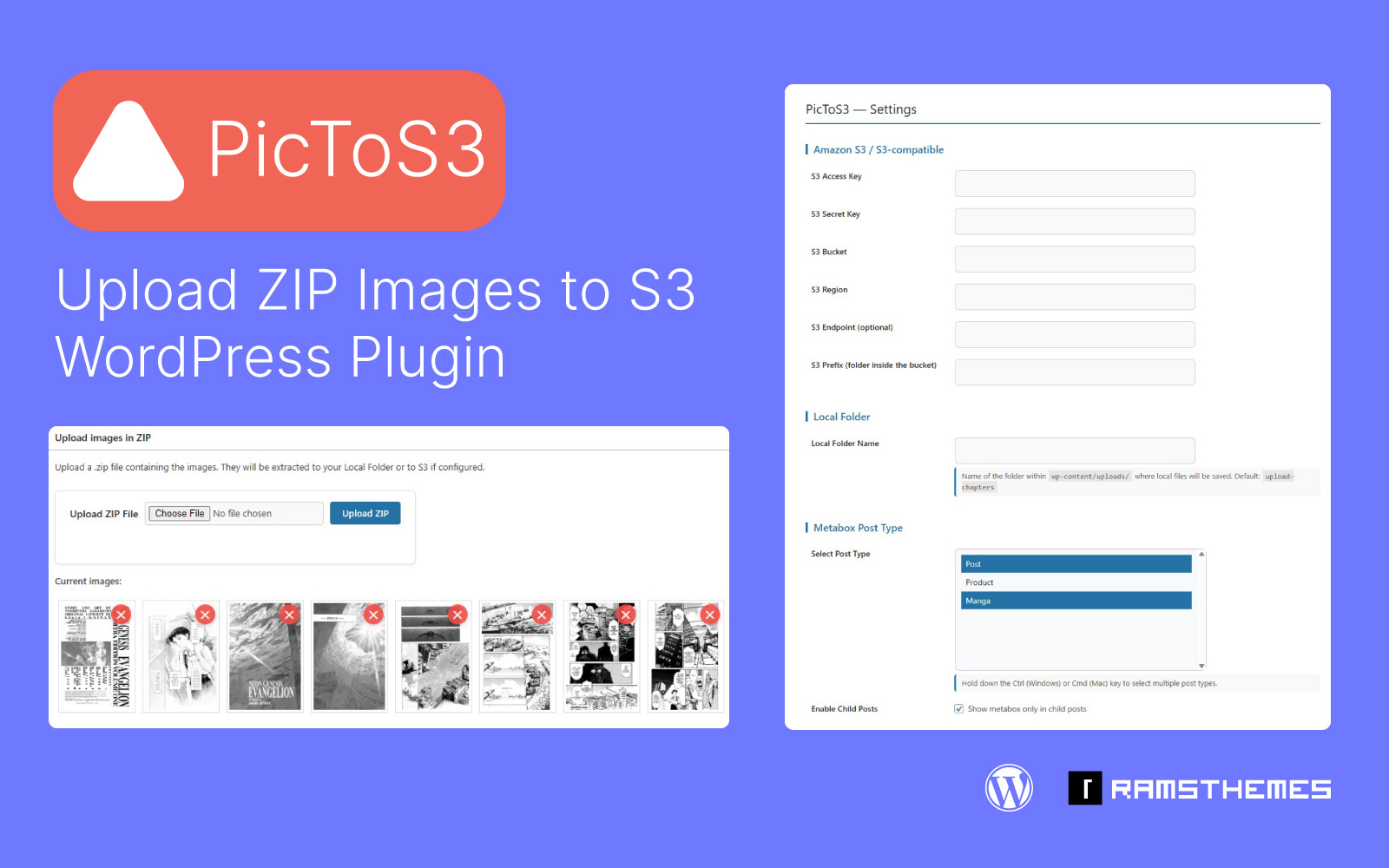
PicToS3 simplifies the process of uploading image-packed ZIP files to WordPress. Whether you’re managing chapter-based content or visual archives, the plugin automatically extracts your ZIP file and displays the images in order once the post is saved. No manual uploads. No clutter. Just fast, structured publishing.
Demo video
Two Upload Modes: Local or S3
PicToS3 adapts to your storage setup with two flexible upload modes:
Local Upload (Default)
If no S3 credentials are added, PicToS3 stores images locally. ZIP files are extracted on your server, and images appear directly in the post editor — ideal for users managing content within their hosting environment.
S3 Upload (Cloud Mode)
Add your S3 credentials, and PicToS3 switches to cloud mode. ZIP files are extracted and uploaded to your Amazon S3 bucket, perfect for high-volume sites or scalable media libraries.
Built for Chapter-Based Content
PicToS3 is optimized for serialized publishing. When working with child posts (like book or manga chapters), the plugin:
- Activates an upload metabox for each child post
- Automatically creates a folder named after the parent post
- Adds subfolders using the child post’s name and ID
- Supports both local and S3 uploads with this structure
This makes it easy to organize chapters visually and structurally — without manual folder creation.
Easy Image Management
Once images are displayed in the editor, you can delete them directly from the metabox — whether stored locally or in S3. No need to dig through file managers or external dashboards.
Smarter Backend Navigation
For sites with dozens or hundreds of chapters, PicToS3 adds a Quick Edit box to access child posts instantly. This keeps your backend clean and your workflow fast.
Licensing & Updates
All plugin updates are guaranteed for verified purchasers with a valid license key. You’ll receive ongoing support and compatibility with future WordPress versions.
Tutorial
How to Upload Images to S3 Bucket with PicToS3 WordPress Plugin
PicToS3 is the ideal solution for publishers, developers, and content creators who need a fast, scalable way to upload and manage chapter-based image content — locally or in the cloud.