
Confirm every WooCommerce order on WhatsApp before you ship
Stop fake and mistyped phone numbers. Customers confirm their order with a QR code or a 6-digit code on WhatsApp. No Meta Business verification, no per-message fees from us.
WhatsAppify is a WooCommerce plugin that verifies customer orders through WhatsApp. After checkout, the customer confirms the order by scanning a QR code or typing a 6-digit code sent to their WhatsApp. Unverified orders stay in a separate status, so you only ship orders from real phone numbers. It works with the classic checkout and Checkout Blocks, and it does not require Meta Business verification, so it suits small shops and individual sellers who do not have a verified Meta business.
Who WhatsAppify is for
Ideal for small online shops and individual sellers who can’t, or don’t want to, verify their business with Meta. The official WhatsApp Cloud API asks for a verified business, and many small sellers and private individuals don’t have one. WhatsAppify works without it.
- Small WooCommerce stores that sell with cash on delivery or bank transfer and want to confirm real buyers.
- Independent sellers and private individuals who sell online without a registered company or Meta Business account.
- Store owners who want to start free with the QR method and add automatic sending only if they need it.
WhatsAppify gives these sellers a simple way to confirm real buyers on WhatsApp. The QR method needs no third-party service, and the optional Whapi.Cloud connection adds automatic sending, with its limits explained up front.
How WhatsApp order verification works
Choose the method that fits your store. You can switch at any time.
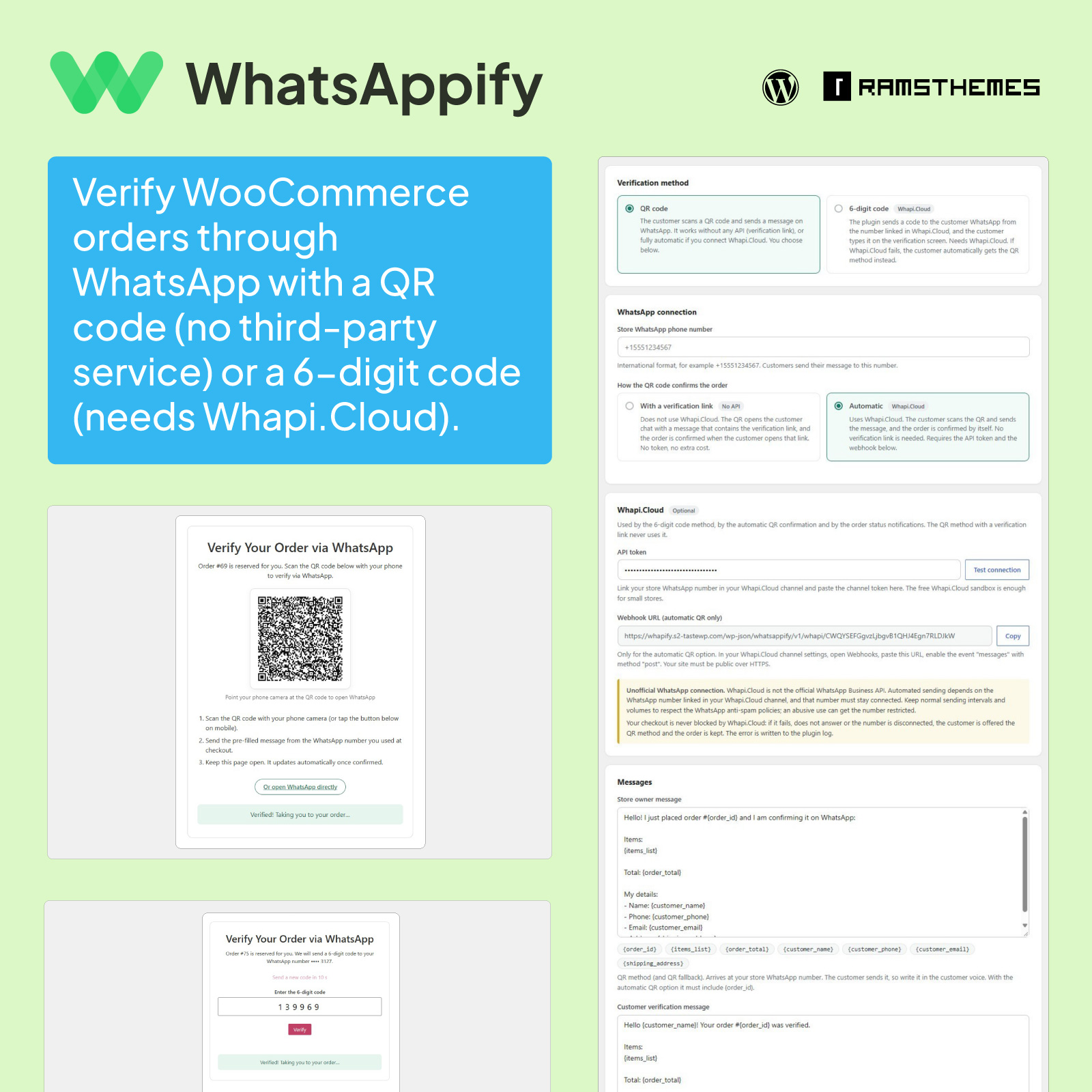
QR code with verification link (no API)
The customer scans a QR code, WhatsApp opens with a pre-filled message, and the customer sends it and taps the link to confirm. No third-party account, no token and no extra cost. Best for stores that want the simplest setup.
Automatic QR (Whapi.Cloud)
The customer scans the QR code and sends the message to your store number. WhatsAppify checks that the message comes from the phone number on the order and confirms it automatically. No link to tap. Requires a Whapi.Cloud account linked to your WhatsApp number.
6-digit code (Whapi.Cloud)
WhatsAppify sends a 6-digit code to the customer’s WhatsApp from your linked number, and the customer types it on the verification screen. The code expires in 5 minutes and works once. Best proof that the customer owns the phone number.
| Method | Needs Whapi.Cloud | Customer action | Proves phone ownership |
| QR + verification link | No | Scan, send, tap link | No |
| Automatic QR | Yes | Scan and send | Yes |
| 6-digit code | Yes | Type the code | Yes |
If Whapi.Cloud is slow or down, the customer automatically gets the QR method instead, so you never lose a sale because of a third-party service.
Features
- Verification before shipping: orders wait in a “Pending WhatsApp Verification” status and auto-cancel after the time you set.
- Smart rules: verify only selected payment methods, skip returning customers, skip orders below an amount.
- Checkout Blocks and classic checkout, plus HPOS compatibility.
- Order status notifications on WhatsApp (processing, completed, cancelled, refunded) through the same Whapi.Cloud connection, sent in the background.
- Rate limiting and attempt limits on code sending and checking.
- Elementor and page-builder ready: shortcodes [whatsappify_verify] and [whatsappify_status].
- Built-in logs in WooCommerce > Status > Logs, with masked phone numbers.
- Admin tools: verification status and method on every order, manual approval, analytics widget.
- Languages: English (US), Spanish, Portuguese (Brazil), French, Italian, German.
Requirements and limits
- WordPress with WooCommerce. Checkout Blocks and HPOS supported.
- The QR + verification link method needs nothing else.
- Automatic QR, the 6-digit code and notifications need a Whapi.Cloud account. Whapi.Cloud is an unofficial WhatsApp gateway, not the official WhatsApp Business API, and it is billed separately by Whapi.Cloud. Its free sandbox suits small stores.
- Automatic sending depends on the WhatsApp number linked in Whapi.Cloud. Keep normal sending volumes to respect WhatsApp anti-spam policies.
- The QR + link method confirms the customer has WhatsApp and opened the link; it does not prove they own the phone number typed at checkout. Use the automatic QR or the 6-digit code for that.
Frequently Ask Questions
WhatsAppify is a WooCommerce plugin that verifies orders through WhatsApp using a QR code or a 6-digit code, so you ship only orders from real, reachable phone numbers.
WhatsAppify is ideal for small online shops and individual sellers who do not verify their business with Meta. It lets them confirm orders on WhatsApp with a QR code, or with a 6-digit code through Whapi.Cloud, without a verified Meta business account.
No. WhatsAppify does not use the official WhatsApp Cloud API, so you do not need a verified Meta business account. The QR method works with no third-party account at all.
Require customers to confirm each order on WhatsApp before you take it forward. The customer places the order and is taken to a verification screen. Until they confirm, the order is held in a “Pending WhatsApp Verification” status and the order emails are held back. Once they confirm, with the QR code or the 6-digit code, the held emails are sent and an order note records the method and the phone number.
With cash on delivery or check payments woocommerce checkout methods, the order then goes to “On hold”. You agree on payment and delivery with the customer, and you move the order to Processing or Completed, or cancel it, whenever you decide. If the customer paid with another payment method, such as a card, the order goes to the status that payment method normally gives it.
Orders that are never confirmed are cancelled automatically after the time you set. You choose which orders need verification: only certain payment methods, no returning customers, nothing below a minimum amount.
Yes. It works with the classic checkout and with Checkout Blocks, and it is compatible with HPOS.
Yes. The code is sent from the number you link in your Whapi.Cloud channel. You do not enter a store number in the plugin for this method.
No. Whapi.Cloud is an unofficial gateway that connects your own WhatsApp number as a linked device, and it is billed separately by Whapi.Cloud. Its free sandbox is enough for a small store with low order volume; if you get high demand, you will need one of its paid plans. As with any unofficial connection, WhatsApp can restrict a number that sends too much or too fast. That risk comes from how the linked number is used and from the Whapi.Cloud connection, not from the plugin, which sends only the messages you set up. Keep normal sending intervals and make sure the linked number stays connected.
Checkout is never blocked. If Whapi.Cloud errors, times out or the number is disconnected, the customer is offered the QR method and the order is kept. The error is written to the WooCommerce log.
No. WhatsAppify has no servers of its own that your customers’ data passes through, and no hidden dependencies that could stop being free tomorrow.
- With the QR method and a verification link, everything happens between your customer’s phone, WhatsApp and your own store. No third-party service is involved.
- With the 6-digit code (and the automatic QR), you connect your own Whapi.Cloud account directly with your own API token. You control the account, and its plan and prices are set by Whapi.Cloud, not by us.
A mistyped phone number, or a cash on delivery (COD) order placed with no real intention to buy, quickly turns into lost shipping costs, goods stuck in transit and hours of manual support.
WhatsAppify makes sure there is a real, active WhatsApp account behind every order before it enters your preparation flow, without making you set up Meta’s complex business API.
Yes. With a Whapi.Cloud connection you can notify customers when an order is processing, completed, cancelled or refunded.
Yes. Add the shortcode [whatsappify_verify] to any page built with Elementor or another builder and choose it as the verification page.
English (US) by default, plus Spanish, Portuguese (Brazil), French, Italian and German.